
 Getting started & help
AtlasLoot Enhanced: WoW Classic x5 guide

AtlasLoot Enhanced is the essential loot reference for WoW Classic. The addon embeds complete drop tables from every dungeon and raid boss directly into the game: you see each item's icon, name and stats without leaving the client.
Contents
 Why you need AtlasLoot
AtlasLoot solves the core planning question: what to farm and where. Instead of alt-tabbing to a website, you open the window in-game and read any boss's loot table.
- Full boss tables — all drops from MC, BWL, ZG, AQ20/40, Naxx and every dungeon
- Class sets — T0/T0.5/T1/T2/T2.5/T3 tabs by slot
- Crafting and reputation — faction rewards, profession recipes, PvP sets
- BiS planning — compare items, flag what you need
Installing AtlasLoot on 1.12.1
| Step | Action |
|---|---|
| 1 | Download the Vanilla AtlasLoot (folders Atlas and AtlasLoot) |
| 2 | Extract both folders into Interface/AddOns/ |
| 3 | Enable the addons in the character-select AddOns menu |
| 4 | In game type /atlasloot to verify |
AtlasLoot pairs with the Atlas addon (dungeon maps). Install both — map and loot complement each other. Map guide: see Atlas.
Using the loot browser

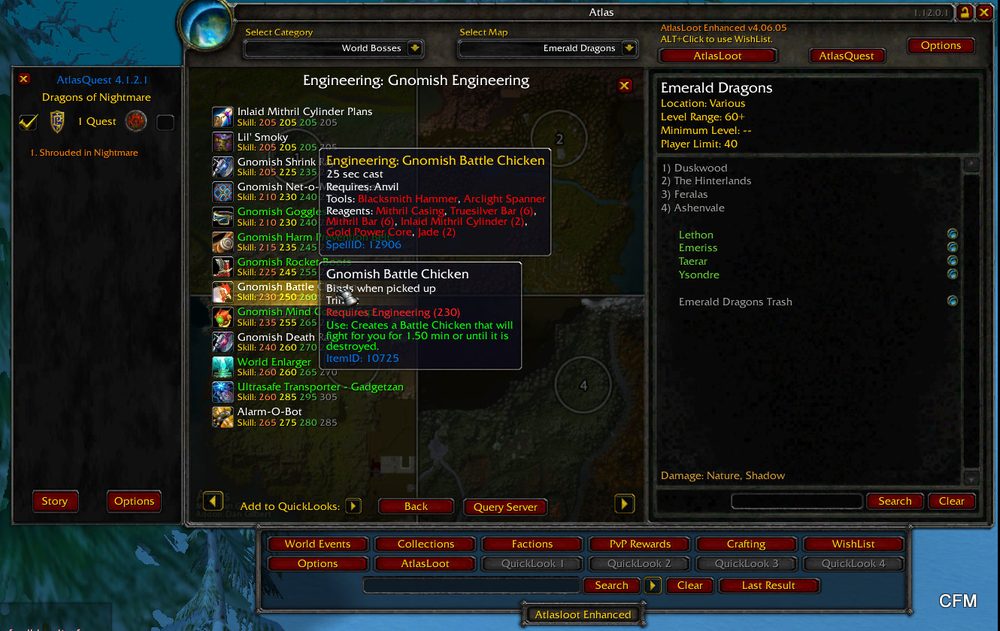
Open the window with /al. On the left are categories (Dungeons, Raids, Sets, Crafting, PvP); on the right, the boss list for the selected location. Clicking a boss opens its loot table.
- Hover an item to see the full stat tooltip
- Shift-click an item to link it in chat — handy for raid discussion
- WishList buttons let you flag wanted items
 Planning BiS on an x5 realm
On x5 rates the road to raids is shorter, so a pre-planned BiS saves weeks. Open the target raid in AtlasLoot and cross-check our pre-raid BiS and raid-set guides.
This is how iconic raid items look in the AtlasLoot window — Band of Accuria and Onslaught Girdle from Ragnaros (Molten Core) and Ashkandi from Nefarian (Blackwing Lair):
 Band of AccuriaBinds when picked upUniqueFinger+16 Agility+10 StaminaRequires Level 60Equip: Improves your chance to hit by 2%.
 Onslaught GirdleBinds when picked upWaistPlate494 Armor+31 Strength+11 StaminaDurability 55 / 55Requires Level 60Equip: Improves your chance to get a critical strike by 1%.Equip: Improves your chance to hit by 1%.
 Ashkandi, Greatsword of the BrotherhoodBinds when picked upTwo-HandSword229 - 344 DamageSpeed 3.50(81.86 damage per second)+33 StaminaDurability 120 / 120Requires Level 60Equip: +86 Attack Power."The initials A.L. are etched on the hilt."
AtlasLoot stores data locally and needs no internet — tables work even during lag. Update the addon on major patches so the loot tables match the server.
◆Related guides
Ready to play? Register on WowX5 and join the x5 realm.
 FAQ
FAQ
?Where do I download AtlasLoot for 1.12.1?
Get the AtlasLoot build for the Vanilla 1.12.1 client from a vanilla-addon GitHub repository. Retail and WotLK builds will not load in the 1.12.1 client.
?How do I open the AtlasLoot window?
Type /atlasloot or /al in chat, or click the AtlasLoot minimap button. The loot browser opens for dungeons and raids.
?AtlasLoot shows items but won't give them to me?
Correct. AtlasLoot is a reference tool: it shows what drops from which boss. You still earn the items in combat.
?Can I view Tier set pieces?
Yes. Raid sections include class set tabs (T1/T2/T3) broken down by slot and source.
Related
Aux: Best Auction House Addon for WoW Classic x5Getting started & help · 2 min read
Atlas: Dungeon Maps and AtlasLoot for WoW ClassicGetting started & help · 3 min read
Bagnon: unified inventory in WoW Classic x5Getting started & help · 2 min read
 Antivirus and firewall block WoW: opening accessGetting started & help · 1 min read
Now jump into WoW Classic X5
Theory alone gives no XP. Join WoW Classic X5 — Vanilla 1.12.1, x5 rates, blizzlike mechanics — and try this guide in game.
- Create an account on wowx5.ru
- Download the WoW Classic 1.12.1 client
- Put into realmlist.wtf:
set realmlist play.wowx5.ru
 Experience ×5
Loot ×5
Free, no pay-to-win
Experience ×5
Loot ×5
Free, no pay-to-win